Moving the Camera with School Math (and ThorVG) — Part 3
The station finally holds still and I fly around it instead. A camera object, five tiny functions, and the oldest magic trick in 3D: to move the camera, you move the whole world the other way. Also a floor to stand on, and a fun bug when you zoom straight through the station.
Last time I gave the space station a light and shaded every face, and the cross and dot product finally made sense to me. At the end of that post I wrote a to-do list, and the first item was moving the camera around, with a note next to it: “the math looks easy, making sense of it will take me time”. I was right about both halves.
This weekend was a lazy one, so I went for the smallest item on the list with the highest return of investment. Moving the camera turned out to be around forty lines, and most of them are functions I almost already had. But it hides the best magic trick in 3D graphics, and the trick is the reason I’m writing this post. Same rule as always: I’m allowed to make any assumption that deletes math, because this is for learning, not for shipping.
a little cleanup first
Two small things before the fun part.
First, the station has been spinning around itself since post one. That spin was doing an important job: without it, the projection just looks like a flat drawing. But now we are the ones who will move, so the station can finally hold still. Deleted.
Second, the light. Last time the light traveled in the same direction the camera looks, into the screen. This time I flipped it to point out of the screen, at the camera:
const light = { x: 0, y: 0, z: -1 };And the face normals flip with it, otherwise the intensity > 0 filter would start keeping the wrong half of the station. That’s one swap of A and B in the cross product — the exact remedy the last post promised for inverted models. Same idea as before, but the sign convention reads much better now: a face that agrees with the light is literally a face that’s looking at us, and those are the faces we keep. Small change, zero new math, easier sentence to hold in my head.
the camera becomes data
Here is something I only noticed while doing this: until now, the camera did not exist in the code. There is no camera variable anywhere in the last two posts. The camera was an assumption — it sits at 0,0,0, it looks toward +z, its field of view is 90 degrees. Every formula was built on top of that assumption, and that’s exactly what made the math simple.
To move a camera, it first has to exist. So, the whole implementation:
const camera = {
    position: { x: 0, y: 0, z: -30 }, // pulled back, so we can see the station
    rotation: { x: 0, y: 0 },         // looking up/down, looking left/right
};
That’s it, a camera is a position and two angles. There could be a third rotation, around the z axis, but that’s tilting your head sideways, and I never do that when I look at things, so I left it out.
you can’t move the camera
My first instinct was: when the user scrolls, add to camera.position.z, done. I did that and nothing moved. Of course nothing moved, no formula in the pipeline reads camera.position.
And here is the part that took me a while: none of them can. Our projection is x/z, y/z. That formula is not a general “project this point for any camera” formula. It’s hard-wired to a camera sitting exactly at the origin, looking exactly at +z. That hard-wiring is the assumption that deleted all the math in post one, and I’m not giving it back.
So we cheat, and this cheat is the whole post: don’t move the camera. Move the world. If the camera should go right, slide the entire world left. The camera stays glued to the origin where our math wants it, and the picture on the screen is exactly the same.
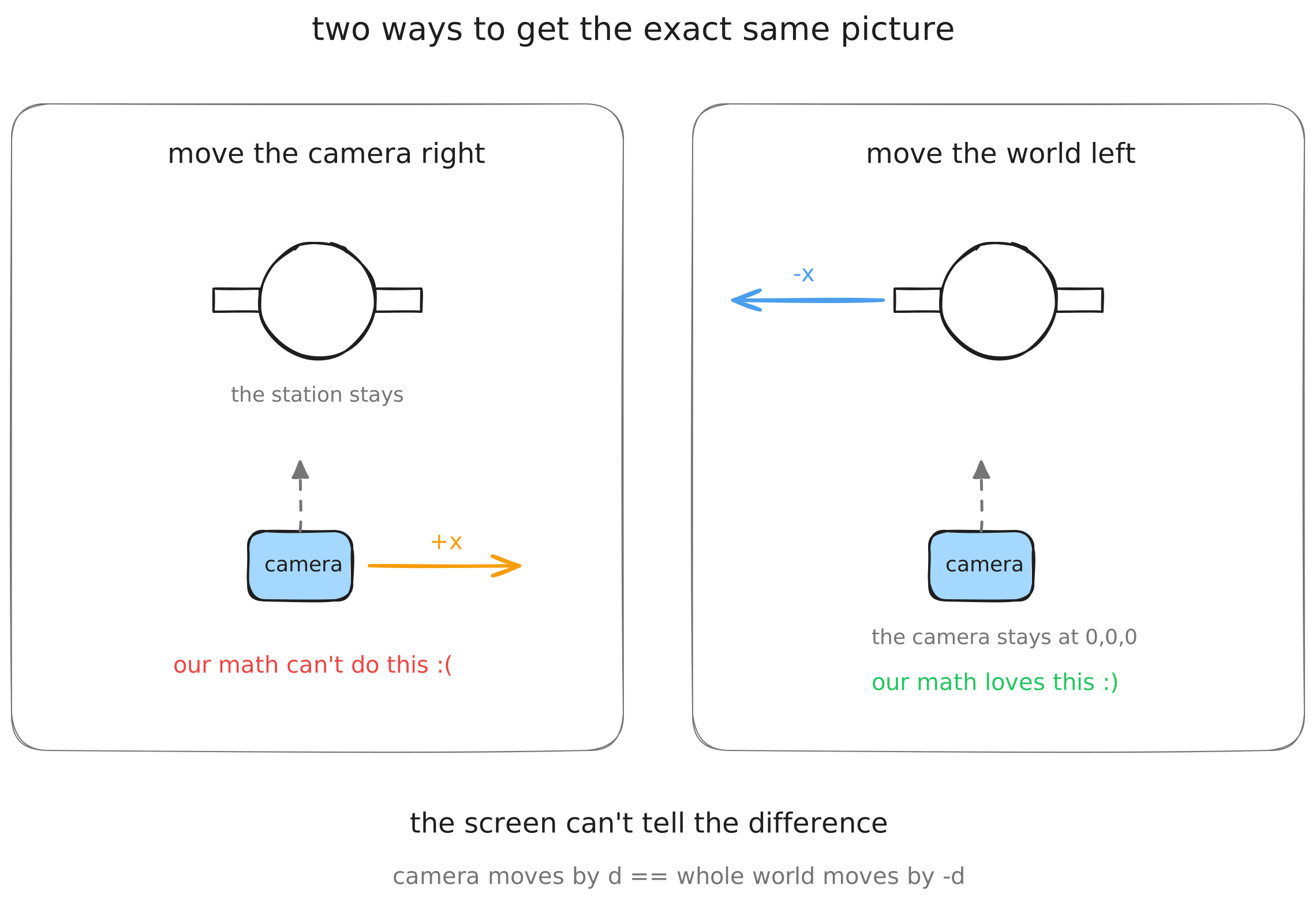
This felt like a dirty hack when I first saw it, and I sat with the question for a while: why don’t we simply move the camera? The answer that made it click for me is that there is no such thing as “simply moving the camera”. The universe in our program has no fixed grid. “The camera is 3 units right of the station” and “the station is 3 units left of the camera” are not two situations, they are two sentences describing one situation. You already know this feeling: you sit in a train, the train next to you slides, and for a second you can’t tell who’s moving. Your eyes can’t tell, and neither can the screen. So we pick the version our math likes.
By the way, this is not my weekend hack, it’s what every real engine does. It’s called the view transform, and it’s done with matrices instead of my baby functions. But it’s the same trick: the camera never moves, the world does.
sliding the world around
To move the world we need to translate points. We had translateZ since post one, now its two siblings join:
function translateX(v, dx) {
    return { ...v, x: v.x + dx };
}
// translateY and translateZ are the same story
And before projecting, every vertex gets pushed opposite to the camera position. The minus signs are the entire magic trick:
const processed = vertices.map((v) => {
    let p = translateX(v, -camera.position.x);
    p = translateY(p, -camera.position.y);
    p = translateZ(p, -camera.position.z);
    return p;
});
For the controls I started wiring up WASD keys, then realized every 3D viewer I ever used speaks mouse, so: scroll to zoom, drag with the right button to pan.
canvas.addEventListener("wheel", (event) => {
    camera.position.z += event.deltaY < 0 ? 0.5 : -0.5;
});

canvas.addEventListener("mousemove", (event) => {
    if (dragging && event.buttons === 2) {
        camera.position.x -= event.movementX * 0.01;
        camera.position.y += event.movementY * 0.01;
    }
});
And wow, that works. Scroll and the station comes closer, drag and it slides. Well — the station comes closer. I keep saying the camera moves. It doesn’t. I’ll keep saying it anyway, everyone does.
rotating is the same trick
Now I want to look at the station from other sides, which means rotating the camera. Same cheat, second verse: to rotate the camera one way, rotate the whole world the other way.
Post one already had rotation code, but it rotated everything by one shared angle. Now I need to rotate around x and y separately, so I split it:
function rotateX(v, angle) {
    const sin = Math.sin(angle);
    const cos = Math.cos(angle);
    return {
        ...v,
        y: v.y * cos - v.z * sin,
        z: v.y * sin + v.z * cos,
    };
}
// rotateY is the same dance on x and z
Left-drag updates the angles, and the processing step grows two lines, with the same minus signs:
const processed = vertices.map((v) => {
    let p = rotateX(v, -camera.rotation.x);
    p = rotateY(p, -camera.rotation.y);

    p = translateX(p, -camera.position.x);
    p = translateY(p, -camera.position.y);
    p = translateZ(p, -camera.position.z);
    return p;
});
the order matters
Look at that snippet again. Rotation first, then translation. I typed it in that order without thinking, and then spent some time understanding what I actually chose, because the other order gives you a completely different camera.
Rotate first: the station sits at the origin, so rotating the world spins it right where it is, in front of you, and then the translation pushes it away. The station never leaves the center of your view. You’re orbiting it.
Translate first: the world slides away first, and then rotates around the origin — and after the translation, the origin is wherever the camera is. So the world pivots around you. That’s turning your own head. First-person-shooter style.
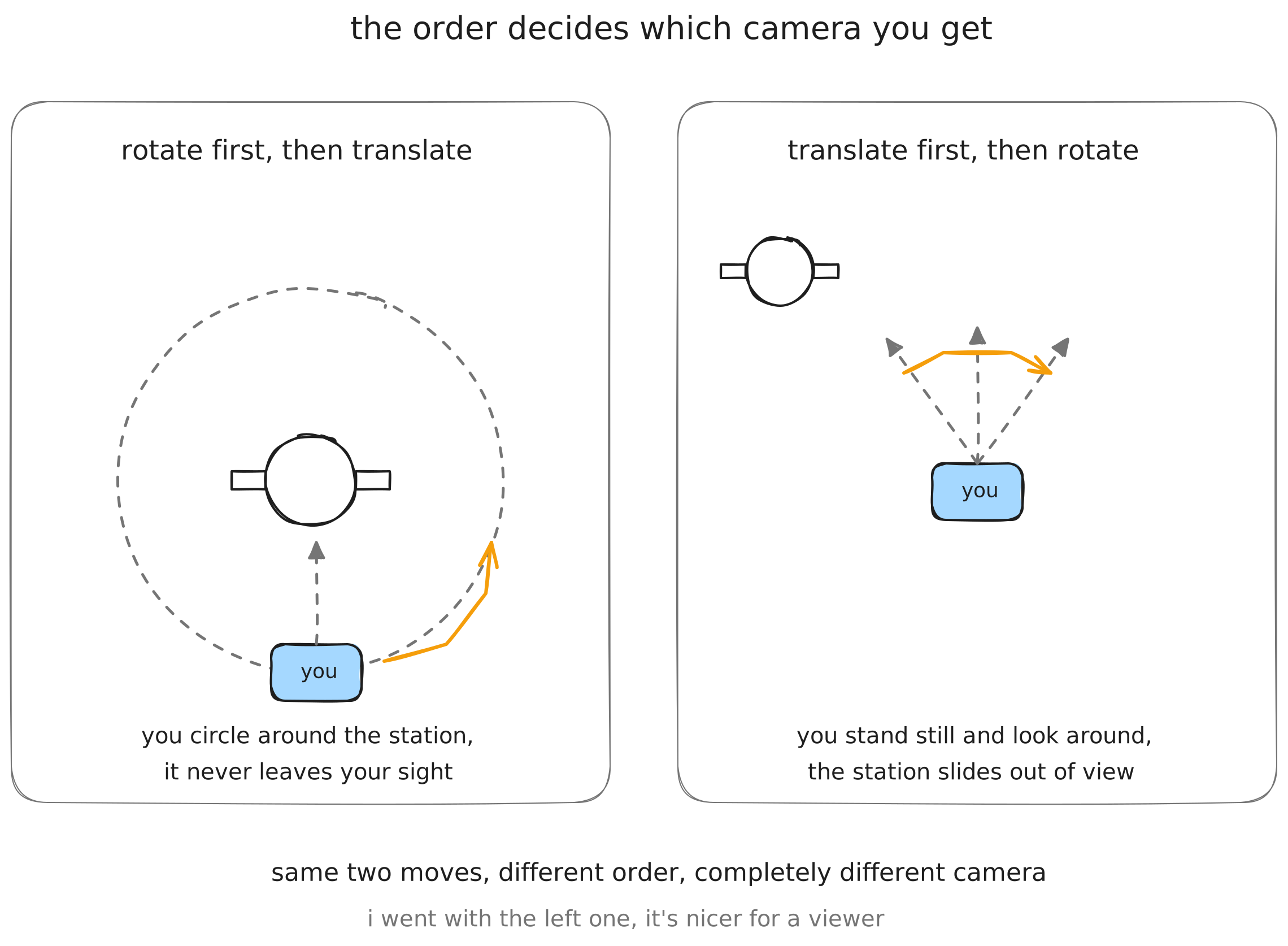
Same two moves, different order, different camera. I went with rotate-first because for a model viewer, orbiting is what you want: the thing you care about stays in front of you. School math strikes again by the way — this is just “matrix multiplication doesn’t commute” wearing a trench coat, and nobody in school ever told me why I should care that A×B ≠ B×A. Well: one order orbits a space station and the other looks around a room. That’s why.
zooming through the station
Then I found the fun bug. Scroll in, keep going, pass through the station — and the screen fills with insane stretched geometry, faces exploding across the whole canvas, some of them flipped to the wrong side. My first thought was that I broke the rotation code. I didn’t. The projection was just doing exactly what I told it to.
Remember the projection is x/z, y/z. When a point is far, z is big, the division makes things small. But as the camera closes in, the point’s z (after our world-shove) heads toward zero — and dividing by an almost-zero makes the projected point huge, it shoots off the canvas. And once you pass through, z goes negative: the division flips the sign, and the point comes back on the opposite side of the screen, upside down. Points behind the camera being drawn, mirrored, in front of you.
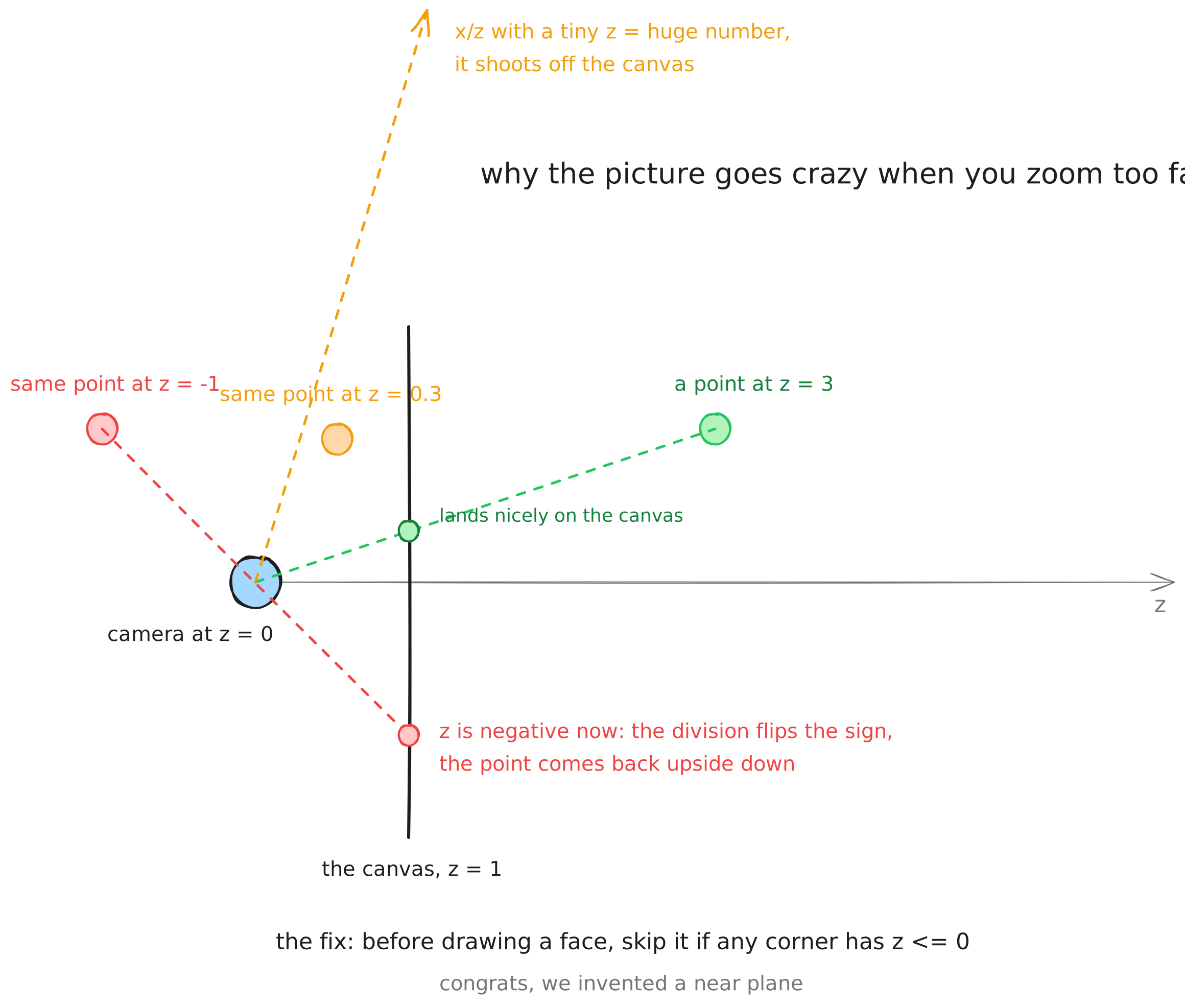
The fix is one if:
if (p1.z <= 0 || p2.z <= 0 || p3.z <= 0) {
    continue; // this face is behind the camera, skip it
}
Any face with a corner at or behind the camera doesn’t get drawn, and the explosion is gone. And apparently this thing has a name: I accidentally implemented a near plane, the invisible wall in front of every game camera. Real engines put it slightly ahead of the camera and properly clip triangles against it, slicing the crossing ones into smaller pieces. Mine just throws whole faces away. Good enough for this weekend. I also stopped the zoom from walking past the station, but the demo below has a button that removes both guards, because honestly the bug is worth seeing.
a floor to stand on
One last thing, because moving the camera exposed a problem I didn’t have before: when the whole world shifts together, your eyes lose track of who moved. Am I orbiting the station, or is it rotating in front of me? (Trick question — inside the code those are literally the same thing. But it feels better when you can tell.) Every 3D tool solves this with a floor grid, so let’s have one.
The grid is lines on the floor plane, below the station, chopped into short pieces:
const floor = [];
for (let i = -40; i <= 40; i += 4) {
    for (let j = -40; j < 40; j += 4) {
        floor.push([{ x: i, y: -10, z: j }, { x: i, y: -10, z: j + 4 }]);
        floor.push([{ x: j, y: -10, z: i }, { x: j + 4, y: -10, z: i }]);
    }
}
Why chopped? The near plane again. A long line can start in front of the camera and end behind it, and handling that properly means computing where the line crosses the plane. Or — I chop every line into bite-size segments and throw away any segment that touches z ≤ 0. Some intersection math deleted, and the cost is tiny gaps near the camera if you go looking for them. My favorite kind of trade.
Each frame, every segment goes through the exact same pipeline as the station’s vertices — same rotate, same translate, same divide-by-z — and gets stroked as one big shape:
const grid = new TVG.Shape();
for (const [a, b] of floor) {
    const p1 = process(a); // rotate + translate, same as the vertices
    const p2 = process(b);
    if (p1.z <= 0 || p2.z <= 0) continue; // near plane, same as the faces

    const s = toCanvas(project(p1));
    const e = toCanvas(project(p2));
    grid.moveTo(s.x, s.y);
    grid.lineTo(e.x, e.y);
}
grid.stroke({ width: 1, color: [90, 130, 200, 120] });
That’s the part I like most about the grid: it’s not special. It’s not a “grid feature”. It’s just more world, and the world already knows how to move.
So here it is. Drag to orbit, right-drag to pan, scroll to zoom. And press the button to remove the near plane, zoom all the way through the station, and enjoy the explosion — press it again when you’ve had enough:
drag to orbit · right-drag to pan · scroll to zoom
loading…
(This demo only computes when you touch it — nothing spins on its own anymore, so your battery is safe, and there’s nothing to bother people who prefer reduced motion. Still capped at 30fps, still pauses off screen.)
an honest ending
Counting the diff this time: one camera object, two new translate functions, two rotate functions, one if statement, and a floor. In exchange, the station went from a thing that rotates in front of you to a thing you fly around, and honestly the project stopped feeling like a math exercise and started feeling like a tool. That’s the biggest return of investment so far in this series.
But the real thing I’m taking away is the trick itself. The camera is a lie. There is no camera. There’s a world that gets rotated and shoved in front of a fixed formula, sixty times a second, and the minus signs are what make it feel like you are the one moving. I knew none of this three weekends ago.
The to-do list, as always, grows faster than I shrink it: a first-person camera (I know exactly which two lines to swap now), proper near-plane clipping, smooth shading, z-buffering, keeping ThorVG shapes alive between frames. Some other weekend.
The first post and the second were the first two payments on a promise to learn in public. Consider this the third.
The whole thing in one file, if you want to play with it
<html>
    <body>
        <canvas id="canvas" style="background: black"></canvas>
        <script src="https://unpkg.com/@thorvg/webcanvas@1.0.8/dist/webcanvas.js"></script>
        <script src="https://unpkg.com/obj-file-parser@0.6.2/dist/OBJFile.js"></script>
        <script type="module">
            const WIDTH = 600;
            const HEIGHT = 600;

            // the light looks at the camera now
            const light = { x: 0, y: 0, z: -1 };

            // the camera is data now
            const camera = {
                position: { x: 0, y: 0, z: -30 },
                rotation: { x: 0, y: 0 },
            };

            const raw = await fetch(
                "https://theashraf.com/blog/3d/space_station.obj",
            ).then((res) => res.text());

            const model = new OBJFile(raw).parse().models[0];
            const vertices = model.vertices;
            const faces = model.faces.map((face) =>
                face.vertices.map((v) => v.vertexIndex - 1),
            );

            function project(v) {
                return { x: v.x / v.z, y: v.y / v.z };
            }
            function toCanvas(p) {
                return {
                    x: (p.x + 1) * (WIDTH / 2),
                    y: (1 - p.y) * (HEIGHT / 2),
                };
            }
            function translateX(v, dx) {
                return { ...v, x: v.x + dx };
            }
            function translateY(v, dy) {
                return { ...v, y: v.y + dy };
            }
            function translateZ(v, dz) {
                return { ...v, z: v.z + dz };
            }
            function rotateX(v, angle) {
                const sin = Math.sin(angle);
                const cos = Math.cos(angle);
                return {
                    ...v,
                    y: v.y * cos - v.z * sin,
                    z: v.y * sin + v.z * cos,
                };
            }
            function rotateY(v, angle) {
                const sin = Math.sin(angle);
                const cos = Math.cos(angle);
                return {
                    ...v,
                    x: v.x * cos + v.z * sin,
                    z: v.z * cos - v.x * sin,
                };
            }
            function vec3(p1, p2) {
                return {
                    x: p2.x - p1.x,
                    y: p2.y - p1.y,
                    z: p2.z - p1.z,
                };
            }
            function normal({ x, y, z }) {
                const m = Math.sqrt(x * x + y * y + z * z);
                return {
                    x: m ? x / m : 0,
                    y: m ? y / m : 0,
                    z: m ? z / m : 0,
                };
            }
            function dot(a, b) {
                return a.x * b.x + a.y * b.y + a.z * b.z;
            }
            function cross(a, b) {
                return {
                    x: a.y * b.z - a.z * b.y,
                    y: a.z * b.x - a.x * b.z,
                    z: a.x * b.y - a.y * b.x,
                };
            }
            function depth(p1, p2, p3) {
                return (p1.z + p2.z + p3.z) / 3;
            }

            // move the world opposite to the camera: rotate first, then translate
            function process(v) {
                let p = rotateX(v, -camera.rotation.x);
                p = rotateY(p, -camera.rotation.y);

                p = translateX(p, -camera.position.x);
                p = translateY(p, -camera.position.y);
                p = translateZ(p, -camera.position.z);
                return p;
            }

            // the floor grid: lines chopped into short segments
            const floor = [];
            for (let i = -40; i <= 40; i += 4) {
                for (let j = -40; j < 40; j += 4) {
                    floor.push([
                        { x: i, y: -10, z: j },
                        { x: i, y: -10, z: j + 4 },
                    ]);
                    floor.push([
                        { x: j, y: -10, z: i },
                        { x: j + 4, y: -10, z: i },
                    ]);
                }
            }

            const htmlCanvas = document.querySelector("#canvas");
            htmlCanvas.width = WIDTH;
            htmlCanvas.height = HEIGHT;

            const TVG = await ThorVG.init({
                renderer: "gl",
                locateFile: (file) =>
                    `https://unpkg.com/@thorvg/webcanvas@1.0.8/dist/${file}`,
            });

            const canvas = new TVG.Canvas("#canvas", {
                width: WIDTH,
                height: HEIGHT,
            });

            function drawFace(p1, p2, p3, shade) {
                const face = new TVG.Shape();
                face.moveTo(p1.x, p1.y);
                face.lineTo(p2.x, p2.y);
                face.lineTo(p3.x, p3.y);
                face.close();
                face.fill(shade, shade, shade, 255);
                canvas.add(face);
            }

            function render() {
                canvas.remove();

                // the grid is just more world
                const grid = new TVG.Shape();
                for (const [a, b] of floor) {
                    const p1 = process(a);
                    const p2 = process(b);
                    if (p1.z <= 0 || p2.z <= 0) continue;
                    const s = toCanvas(project(p1));
                    const e = toCanvas(project(p2));
                    grid.moveTo(s.x, s.y);
                    grid.lineTo(e.x, e.y);
                }
                grid.stroke({ width: 1, color: [90, 130, 200, 120] });
                canvas.add(grid);

                const processed = vertices.map(process);

                const shadedFaces = faces
                    .map(([i1, i2, i3]) => {
                        const p1 = processed[i1];
                        const p2 = processed[i2];
                        const p3 = processed[i3];

                        // the near plane: skip faces behind the camera
                        if (p1.z <= 0 || p2.z <= 0 || p3.z <= 0) {
                            return [i1, i2, i3, -1, 0];
                        }

                        // A and B swapped since last post,
                        // so the normals flip along with the light
                        const faceNormal = normal(
                            cross(vec3(p1, p3), vec3(p1, p2)),
                        );
                        const intensity = dot(light, faceNormal);
                        const d = depth(p1, p2, p3);

                        return [i1, i2, i3, intensity, d];
                    })
                    .filter((face) => face[3] > 0); // backface culling

                // painter's algorithm: farthest first
                shadedFaces.sort((a, b) => b[4] - a[4]);

                const points = processed.map((v) => toCanvas(project(v)));

                for (const [i1, i2, i3, intensity] of shadedFaces) {
                    const shade = 50 + Math.floor(intensity * 200);
                    drawFace(points[i1], points[i2], points[i3], shade);
                }

                canvas.update();
                canvas.render();
                requestAnimationFrame(render);
            }
            requestAnimationFrame(render);

            htmlCanvas.addEventListener("wheel", (event) => {
                event.preventDefault();
                if (event.deltaY < 0) {
                    // zoom in, but never through the near plane
                    camera.position.z = Math.min(
                        camera.position.z + 0.5,
                        -0.5,
                    );
                } else {
                    camera.position.z -= 0.5;
                }
            });

            let dragging = false;
            htmlCanvas.addEventListener("mousedown", () => (dragging = true));
            htmlCanvas.addEventListener("mouseup", () => (dragging = false));
            htmlCanvas.addEventListener("mouseleave", () => (dragging = false));
            htmlCanvas.addEventListener("contextmenu", (e) =>
                e.preventDefault(),
            );
            htmlCanvas.addEventListener("mousemove", (event) => {
                if (!dragging) return;
                if (event.buttons === 2) {
                    // pan
                    camera.position.x -= event.movementX * 0.01;
                    camera.position.y += event.movementY * 0.01;
                } else {
                    // orbit
                    camera.rotation.y -= event.movementX * 0.01;
                    camera.rotation.x -= event.movementY * 0.01;
                }
            });
        </script>
    </body>
</html>